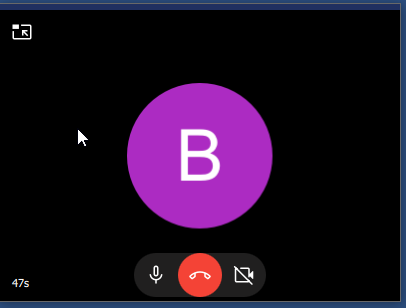
The last three versions for QT in Windows show a strange behaviour. If you have a voice call established and minimize the application the JAMI window is minimized as expected but a second window is suddenly shown which can neither be closed, moved or sized in any way.
Is this a new expected behavaiour or a new bug. The problem started with versions since July. So there is no way to have JAMI in minimized state when a call is active.
Just tested the different versions to find out when this ugly behaviour started.
The last version not affected is 202604031240
I’m quite surprised that no one else mentioned this problem. For me it makes JAMI unusable and I now switched back to the version mentioned above and also all my team members.
The problem is that if you are in an audio conversation and want to check a document or e-mail ore something on a window behind the JAMI window and therefore minimize JAMI to get access to that program on you desktop this additional ugly window opens at the center of you desktop with TOPMOST property set which cannot be moved or hidden and you are not able to bring any other window in front of that one. So you are not able to access the applications which are hidden by the JAMI window.
Recently, I seldom use Jami on the desktop, but I guess there is a top setting function or similar functions, such as picture in picture. You need to cancel it
The first and most interesting thing to know would be if this behavour is an intended change or a bug.
I’m not a QT programmer so I only know this for WinAPI programming. There is the Flag HWND_TOPMOST for the hWndInsertAfter parameter which you can specify when calling SetWindowPos.
For me it would not make any sense for this to be intended. Nobody wants an app which is so intrusive that it cannot be minimized and permanently places itself in front of all other windows without the ability to change this.