Client Jami sous MacOS Tahoe : problème avec caméra USB externe

Bonjour,

J’ai récemment installé le client Jami sous mon Macbook Pro 2023 (MacOS Tahoe 26.3.1).
La caméra intégrée fonctionne très bien et est bien reconnue par Jami.
Mais lorsque je veux utiliser ma caméra externe USB habituelle (Logitech), l’interface du client cesse de répondre.

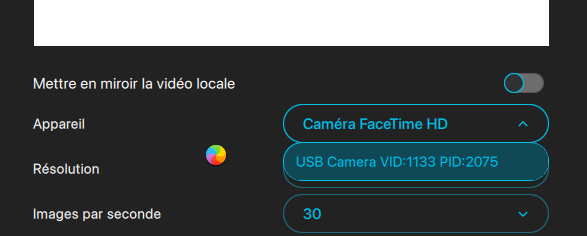
Pour être plus clair, lorsque je me rends dans les paramètres > Média > Vidéo, la caméra interne est sélectionnée par défaut. Je choisis alors ma caméra USB dans la liste déroulante (“USB Camera VID:1133 PID:2075”), et dès que je clique dessus l’interface plante complètement et je dois forcer la fin du processus. Il se produit la même chose lorsque je change la caméra pendant une visioconférence.

Les derniers logs que j’obtiens dans la console système est :
Cameras changed to [ControlCenterApp.VideoCamera(id: “0x1112000046d081b”, name: “USB Camera VID:1133 PID:2075”, utType: Optional(<_UTCoreType 0x1fc148b50> com.apple.device (not dynamic, declared)), batteryInfo: nil, deskViewID: nil, aspectRatio: Optional(1.3333333333333333), isBuiltIn: false, supportedEffects: [portrait, studioLight, ringLight, gestures, background], adjustableEffects: [portrait, studioLight], availableReactions: [heart, thumbsUp, thumbsDown, balloons, rain, confetti, lasers, fireworks], appEffects: , manualFramingSupported: false, zoomFactor: 0.0, zoomRange: ClosedRange(0.0…0.0), canResetFraming: true, manualFramingLens: nil, knownLenses: , canRestrictCenterStageFieldOfView: true, centerStageFieldOfView: ControlCenterApp.VideoCamera.CenterStageFieldOfView.unrestricted), ControlCenterApp.VideoCamera(id: “3F45E80A-0176-46F7-B185-BB9E2C0E82E3”, name: “Caméra FaceTime HD”, utType: Optional(<UTType 0x97ab78fd0> com.apple.macbookpro-14-2023 (not dynamic, declared)), batteryInfo: nil, deskViewID: nil,<…>

<<<< AVCaptureDALDevice >>>> +[AVCaptureDALDevice _refreshPreferredCameraProperties:]: userPreferredCameraChanged T, resolved userPreferredCamera = <AVCaptureDALDevice: 0x71f335200 [USB Camera VID:1133 PID:2075][0x1112000046d081b]>, current sUserPreferredCamera = (null)

Je tenais à signaler ce problème, je crois qu’il y a eu des changements depuis Sonoma dans le composant AVCaptureDALDevice, et il doit sans doute avoir une correction à faire pour que cela fonctionne à nouveau.

Merci ! :slight_smile:

Bonjour,

Merci pour votre rapport détaillé — la ligne de log AVFoundation DAL que vous avez fournie est particulièrement utile.

De notre côté, nous n’avons pas réussi à reproduire exactement le blocage sur macOS Tahoe avec une caméra USB Logitech. En revanche, avec un appareil similaire, nous avons pu reproduire un problème proche où aucune vidéo ne s’affiche après la sélection de la caméra.

Une correction pour ce problème sera incluse dans la prochaine version de Jami. Cette version n’est pas encore publiée, mais devrait être disponible prochainement. Dès qu’elle sera disponible, pourriez-vous essayer à nouveau et nous indiquer si le blocage persiste de votre côté?

Si le problème est toujours présent, les logs de la nouvelle version (en particulier au moment du changement de caméra) nous aideraient à analyser plus précisément la situation.

Pourriez-vous également confirmer si vous utilisez la version provenant de jami.net ou celle de l’App Store?

Bonjour et merci pour votre réponse !

Dès que la nouvelle version sera disponible, je ferais un test et je vous ferais un retour.
Je vous confirme que j’utilise la version téléchargée depuis jami.net

Build ID: 2026032615
Version: 44cd4612.dec206438

La nouvelle version est maintenant disponible.

Merci de nous indiquer si le problème se reproduit toujours de votre côté.

Bonjour,

Je viens de tester avec la nouvelle version (Build ID: 2026042111 / Version: 50dccbca.d4bfbc1cb), et je constate que le problème est malheureusement toujours présent.

Lorsque je sélectionne ma caméra Logitech dans la liste déroulante, l’interface cesse de répondre :

Je vous mets ci-dessous la totalité des logs contenant “Jami” et “camera”, en espérant que ça puisse vous aider.

Logs contenant “Jami” :

par défaut 20:22:09.311935+0200 WindowServer 958ab[DoDeferredOrdering]: [DeferringManager] Updating policy {
advicePolicy: .frontmost;
frontmostProcess: 0x0-0x9e09e (Jami) mainConnectionID: 958AB;
} for reason: updated frontmost process
par défaut 20:22:09.312107+0200 WindowServer 958ab[DoDeferredOrdering]: [DeferringManager] Deferring events from frontmost process PSN 0x0-0x9e09e (Jami) → <pid: 3488>
par défaut 20:22:09.312284+0200 WindowServer new deferring rules for pid:170: [
[170-13A]; <keyboardFocus; Jami:0x0-0x9e09e>; () → <pid: 3488>; reason: frontmost PSN → outbound target,
[170-139]; <keyboardFocus; >; () → <token: Jami:0x0-0x9e09e; pid: 170>; reason: frontmost PSN,
[170-138]; ; () → <token: ; pid: 170>; reason: Deferring to
]
par défaut 20:22:09.312346+0200 WindowServer [keyboardFocus 0xa83466c60] setRules:forPID(170): [
[170-13A]; <keyboardFocus; Jami:0x0-0x9e09e>; () → <pid: 3488>; reason: frontmost PSN → outbound target,
[170-139]; <keyboardFocus; >; () → <token: Jami:0x0-0x9e09e; pid: 170>; reason: frontmost PSN,
[170-138]; ; () → <token: ; pid: 170>; reason: Deferring to
]
par défaut 20:22:09.313213+0200 WindowServer chain did update (setDeferringRules) <keyboardFocus; display: null> containsEndOfChain: YES; [
<token: ; pid: 170>,
<token: Jami:0x0-0x9e09e; pid: 170>,
<pid: 3488>,
<token: viewbridge-key-window; pid: 3488>
]
par défaut 20:22:09.320214+0200 Jami [0xbef431400] activating connection: mach=false listener=false peer=false name=com.apple.TextInputUI.xpc.CursorUIViewService
par défaut 20:22:09.320466+0200 Jami [0xbef431400] invalidated after the last release of the connection object
par défaut 20:22:09.320683+0200 Jami [0xbef431540] activating connection: mach=false listener=false peer=false name=(anonymous)
par défaut 20:22:09.320735+0200 Jami [0xbef431400] activating connection: mach=false listener=false peer=false name=(anonymous)
par défaut 20:22:09.336532+0200 Jami -[TUINSCursorUIController activate:]_block_invoke: Create CursorUIViewService: TUINSRemoteViewController
par défaut 20:22:09.336652+0200 Jami [0xbef4303c0] invalidated because the current process cancelled the connection by calling xpc_connection_cancel()
par défaut 20:22:09.336668+0200 Jami [0xbef430280] invalidated because the current process cancelled the connection by calling xpc_connection_cancel()
erreur 20:22:09.336716+0200 Jami ViewBridge to RemoteViewService Terminated: Error Domain=com.apple.ViewBridge Code=18 UserInfo={com.apple.ViewBridge.error.hint=this process disconnected remote view controller – benign unless unexpected, com.apple.ViewBridge.error.description=NSViewBridgeErrorCanceled}
par défaut 20:22:09.338412+0200 WindowServer chain did update (setDeferringRules) <keyboardFocus; display: null> containsEndOfChain: YES; [
<token: ; pid: 170>,
<token: Jami:0x0-0x9e09e; pid: 170>,
<pid: 3488>,
<token: viewbridge-key-window; pid: 3488>
]
par défaut 20:22:09.339179+0200 WindowServer chain did update (setDeferringRules) <keyboardFocus; display: null> containsEndOfChain: YES; [
<token: ; pid: 170>,
<token: Jami:0x0-0x9e09e; pid: 170>,
<pid: 3488>,
<token: viewbridge-key-window; pid: 3488>
]
par défaut 20:22:09.342282+0200 kernel Sandbox: ContextStoreAgent(2567) allow file-read-data /Applications/Jami.app
par défaut 20:22:09.342756+0200 kernel Sandbox: ContextStoreAgent(2567) allow file-read-data /Applications/Jami.app/Contents
par défaut 20:22:09.343017+0200 kernel Sandbox: ContextStoreAgent(2567) allow file-read-data /Applications/Jami.app/Contents/Info.plist
par défaut 20:22:09.345766+0200 kernel Sandbox: ContextStoreAgent(2567) allow file-read-data /Applications/Jami.app
par défaut 20:22:09.346498+0200 kernel Sandbox: ContextStoreAgent(2567) allow file-read-data /Applications/Jami.app/Contents/MacOS/Jami
par défaut 20:22:09.346831+0200 kernel 1 duplicate report for Sandbox: ContextStoreAgent(2567) allow file-read-data /Applications/Jami.app/Contents/MacOS/Jami
par défaut 20:22:09.346837+0200 kernel Sandbox: ContextStoreAgent(2567) allow file-read-xattr /Applications/Jami.app/Contents/MacOS/Jami
par défaut 20:22:09.362797+0200 kernel Sandbox: ContextStoreAgent(2567) allow file-read-data /Applications/Jami.app/Contents/Info.plist
par défaut 20:28:18.171191+0200 WindowServer b05ab[DoDeferredOrdering]: [DeferringManager] Updating policy {
advicePolicy: .frontmost;
frontmostProcess: 0x0-0xa40a4 (Jami) mainConnectionID: B05AB;
} for reason: updated frontmost process
par défaut 20:28:18.171361+0200 WindowServer b05ab[DoDeferredOrdering]: [DeferringManager] Deferring events from frontmost process PSN 0x0-0xa40a4 (Jami) → <pid: 3572>
par défaut 20:28:18.171536+0200 WindowServer new deferring rules for pid:170: [
[170-179]; <keyboardFocus; Jami:0x0-0xa40a4>; () → <pid: 3572>; reason: frontmost PSN → outbound target,
[170-178]; <keyboardFocus; >; () → <token: Jami:0x0-0xa40a4; pid: 170>; reason: frontmost PSN,
[170-177]; ; () → <token: ; pid: 170>; reason: Deferring to
]
par défaut 20:28:18.171597+0200 WindowServer [keyboardFocus 0xa83466c60] setRules:forPID(170): [
[170-179]; <keyboardFocus; Jami:0x0-0xa40a4>; () → <pid: 3572>; reason: frontmost PSN → outbound target,
[170-178]; <keyboardFocus; >; () → <token: Jami:0x0-0xa40a4; pid: 170>; reason: frontmost PSN,
[170-177]; ; () → <token: ; pid: 170>; reason: Deferring to
]
par défaut 20:28:18.172658+0200 WindowServer chain did update (setDeferringRules) <keyboardFocus; display: null> containsEndOfChain: YES; [
<token: ; pid: 170>,
<token: Jami:0x0-0xa40a4; pid: 170>,
<pid: 3572>,
<token: viewbridge-key-window; pid: 3572>
]
par défaut 20:28:18.179416+0200 Jami [0xa646fd400] activating connection: mach=false listener=false peer=false name=com.apple.TextInputUI.xpc.CursorUIViewService
par défaut 20:28:18.179713+0200 Jami [0xa646fd400] invalidated after the last release of the connection object
par défaut 20:28:18.179892+0200 Jami [0xa646fd540] activating connection: mach=false listener=false peer=false name=(anonymous)
par défaut 20:28:18.179948+0200 Jami [0xa646fd400] activating connection: mach=false listener=false peer=false name=(anonymous)
par défaut 20:28:18.196346+0200 Jami -[TUINSCursorUIController activate:]_block_invoke: Create CursorUIViewService: TUINSRemoteViewController
par défaut 20:28:18.196794+0200 Jami [0xa646fcb40] invalidated because the current process cancelled the connection by calling xpc_connection_cancel()
par défaut 20:28:18.196825+0200 Jami [0xa646fcc80] invalidated because the current process cancelled the connection by calling xpc_connection_cancel()
par défaut 20:28:18.198997+0200 WindowServer chain did update (setDeferringRules) <keyboardFocus; display: null> containsEndOfChain: YES; [
<token: ; pid: 170>,
<token: Jami:0x0-0xa40a4; pid: 170>,
<pid: 3572>,
<token: viewbridge-key-window; pid: 3572>
]
par défaut 20:28:18.200347+0200 WindowServer chain did update (setDeferringRules) <keyboardFocus; display: null> containsEndOfChain: YES; [
<token: ; pid: 170>,
<token: Jami:0x0-0xa40a4; pid: 170>,
<pid: 3572>,
<token: viewbridge-key-window; pid: 3572>
]
par défaut 20:28:18.205254+0200 kernel Sandbox: ContextStoreAgent(2567) allow file-read-data /Applications/Jami.app
par défaut 20:28:18.205389+0200 kernel Sandbox: ContextStoreAgent(2567) allow file-read-data /Applications/Jami.app/Contents
par défaut 20:28:18.205586+0200 kernel Sandbox: ContextStoreAgent(2567) allow file-read-data /Applications/Jami.app/Contents/Info.plist
par défaut 20:28:18.207551+0200 kernel Sandbox: ContextStoreAgent(2567) allow file-read-data /Applications/Jami.app
par défaut 20:28:18.208333+0200 kernel Sandbox: ContextStoreAgent(2567) allow file-read-data /Applications/Jami.app/Contents/MacOS/Jami
par défaut 20:28:18.208658+0200 kernel 1 duplicate report for Sandbox: ContextStoreAgent(2567) allow file-read-data /Applications/Jami.app/Contents/MacOS/Jami
par défaut 20:28:18.208663+0200 kernel Sandbox: ContextStoreAgent(2567) allow file-read-xattr /Applications/Jami.app/Contents/MacOS/Jami
par défaut 20:28:18.251094+0200 kernel Sandbox: ContextStoreAgent(2567) allow file-read-data /Applications/Jami.app/Contents/Info.plist
par défaut 20:29:43.323205+0200 kernel process Jami[3572] thread 213184 caught burning CPU! It used more than 50% CPU over 180 seconds
par défaut 20:29:43.323316+0200 symptomsd Received CPU usage trigger:
Jami[3572] () used 90.00s of CPU over 90.10 seconds (averaging 99%), violating a CPU usage limit of 90.00s over 180 seconds.
par défaut 20:29:43.326930+0200 symptomsd RESOURCE_NOTIFY trigger for Jami [3572] (90000000041 nanoseconds of CPU usage over 90.00s seconds, violating limit of 90000000000 nanoseconds of CPU usage over 180.00s seconds)
erreur 20:29:44.001197+0200 spindump Jami [3572]: No microstackshots found
erreur 20:29:44.001991+0200 spindump Jami [3572]: cpu resource: no microstackshots: 0 out-of-order microstackshots, 0 microstackshots missing load infos, 0 bytes invalid

Logs contenant “Camera” :

par défaut 20:28:33.279704+0200 ControlCenter <<<< AVControlCenterModules >>>> AVControlCenterIsDockedTrackingActiveForDevice: DockedTrackingEnabled: NO on
par défaut 20:28:33.281582+0200 ControlCenter <<<< AVControlCenterModules >>>> AVControlCenterModulesShouldBeShownForBundleID: called for bundleID: cx.ring
par défaut 20:28:33.281627+0200 ControlCenter <<<< AVControlCenterModules >>>> AVControlCenterVideoEffectsModuleShouldBeShownForBundleID: called for bundleID: cx.ring
par défaut 20:28:33.281668+0200 ControlCenter <<<< AVControlCenterModules >>>> AVControlCenterVideoEffectsModuleShouldBeShownForBundleID: cx.ring active:1
par défaut 20:28:33.281696+0200 ControlCenter <<<< AVControlCenterModules >>>> AVControlCenterMicrophoneModuleShouldBeShownForBundleID: called for bundleID: cx.ring
par défaut 20:28:33.281723+0200 ControlCenter <<<< AVControlCenterModules >>>> AVControlCenterMicrophoneModuleShouldBeShownForBundleID: cx.ring active:1
par défaut 20:28:33.281743+0200 ControlCenter <<<< AVControlCenterModules >>>> AVControlCenterModulesShouldBeShownForBundleID: cx.ring videoEffectsShouldBeShown:1 micModesShouldBeShown:1
par défaut 20:28:33.281841+0200 ControlCenter <<<< AVControlCenterModules >>>> AVControlCenterModulesShouldBeShownForBundleID: called for bundleID: cx.ring
par défaut 20:28:33.282016+0200 ControlCenter <<<< AVControlCenterModules >>>> AVControlCenterVideoEffectsModuleShouldBeShownForBundleID: called for bundleID: cx.ring
par défaut 20:28:33.282048+0200 ControlCenter <<<< AVControlCenterModules >>>> AVControlCenterVideoEffectsModuleShouldBeShownForBundleID: cx.ring active:1
par défaut 20:28:33.282160+0200 ControlCenter <<<< AVControlCenterModules >>>> AVControlCenterMicrophoneModuleShouldBeShownForBundleID: called for bundleID: cx.ring
par défaut 20:28:33.282200+0200 ControlCenter <<<< AVControlCenterModules >>>> AVControlCenterMicrophoneModuleShouldBeShownForBundleID: cx.ring active:1
par défaut 20:28:33.282222+0200 ControlCenter <<<< AVControlCenterModules >>>> AVControlCenterModulesShouldBeShownForBundleID: cx.ring videoEffectsShouldBeShown:1 micModesShouldBeShown:1
par défaut 20:28:33.282289+0200 ControlCenter <<<< AVControlCenterModules >>>> AVControlCenterModulesShouldBeShownForBundleID: called for bundleID: cx.ring
par défaut 20:28:33.282352+0200 ControlCenter <<<< AVControlCenterModules >>>> AVControlCenterMicrophoneModesModuleGetSupportedMicrophoneModesForBundleID: supportedModes:(
0,
1,
2
)
par défaut 20:28:33.282392+0200 ControlCenter <<<< AVControlCenterModules >>>> AVControlCenterVideoEffectsModuleShouldBeShownForBundleID: called for bundleID: cx.ring
par défaut 20:28:33.282480+0200 ControlCenter <<<< AVControlCenterModules >>>> AVControlCenterMicrophoneModesModuleIsVoiceProcessingBypassedForBundleID: vpBypassed:false
par défaut 20:28:33.282521+0200 ControlCenter <<<< AVControlCenterModules >>>> AVControlCenterVideoEffectsModuleShouldBeShownForBundleID: cx.ring active:1
par défaut 20:28:33.282541+0200 ControlCenter <<<< AVControlCenterModules >>>> AVControlCenterMicrophoneModesModuleGetHiddenMicrophoneModesForBundleID: hiddenModes:(
)
par défaut 20:28:33.282556+0200 ControlCenter <<<< AVControlCenterModules >>>> AVControlCenterMicrophoneModuleShouldBeShownForBundleID: called for bundleID: cx.ring
par défaut 20:28:33.282608+0200 ControlCenter <<<< AVControlCenterModules >>>> AVControlCenterMicrophoneModesModuleGetActiveMicrophoneModeForBundleID: activeMicMode:.default
par défaut 20:28:33.282645+0200 ControlCenter <<<< AVControlCenterModules >>>> AVControlCenterMicrophoneModuleShouldBeShownForBundleID: cx.ring active:1
par défaut 20:28:33.282746+0200 ControlCenter <<<< AVControlCenterModules >>>> AVControlCenterModulesShouldBeShownForBundleID: cx.ring videoEffectsShouldBeShown:1 micModesShouldBeShown:1
par défaut 20:28:33.282836+0200 ControlCenter <<<< AVControlCenterModules >>>> AVControlCenterModulesShouldBeShownForBundleID: called for bundleID: cx.ring
par défaut 20:28:33.282903+0200 ControlCenter <<<< AVControlCenterModules >>>> AVControlCenterVideoEffectsModuleShouldBeShownForBundleID: called for bundleID: cx.ring
par défaut 20:28:33.282942+0200 ControlCenter <<<< AVControlCenterModules >>>> AVControlCenterVideoEffectsModuleShouldBeShownForBundleID: cx.ring active:1
par défaut 20:28:33.282987+0200 ControlCenter <<<< AVControlCenterModules >>>> AVControlCenterMicrophoneModuleShouldBeShownForBundleID: called for bundleID: cx.ring
par défaut 20:28:33.283015+0200 ControlCenter <<<< AVControlCenterModules >>>> AVControlCenterMicrophoneModuleShouldBeShownForBundleID: cx.ring active:1
par défaut 20:28:33.283061+0200 ControlCenter <<<< AVControlCenterModules >>>> AVControlCenterModulesShouldBeShownForBundleID: cx.ring videoEffectsShouldBeShown:1 micModesShouldBeShown:1
par défaut 20:28:33.283107+0200 ControlCenter <<<< AVControlCenterModules >>>> AVControlCenterModulesShouldBeShownForBundleID: called for bundleID: cx.ring
par défaut 20:28:33.283132+0200 ControlCenter <<<< AVControlCenterModules >>>> AVControlCenterVideoEffectsModuleShouldBeShownForBundleID: called for bundleID: cx.ring
par défaut 20:28:33.281734+0200 ControlCenter <<<< AVControlCenterModules >>>> -[AVControlCenterModuleState manualFramingOriginalVideoZoomFactor]: Manual Framing original video zoom factor: 0.000000
par défaut 20:28:33.283157+0200 ControlCenter <<<< AVControlCenterModules >>>> AVControlCenterVideoEffectsModuleShouldBeShownForBundleID: cx.ring active:1
par défaut 20:28:33.283181+0200 ControlCenter <<<< AVControlCenterModules >>>> AVControlCenterManualFramingGetVideoZoomFactor: manualFramingOriginalVideoZoomFactor: 0.000
par défaut 20:28:33.283231+0200 ControlCenter <<<< AVControlCenterModules >>>> AVControlCenterMicrophoneModuleShouldBeShownForBundleID: called for bundleID: cx.ring
par défaut 20:28:33.283320+0200 ControlCenter <<<< AVControlCenterModules >>>> AVControlCenterManualFramingMinAvailableVideoZoomFactor: ManualFramingMinAvailableVideoZoomFactor 0.000 for
par défaut 20:28:33.283360+0200 ControlCenter <<<< AVControlCenterModules >>>> AVControlCenterMicrophoneModuleShouldBeShownForBundleID: cx.ring active:1
par défaut 20:28:33.283401+0200 ControlCenter <<<< AVControlCenterModules >>>> AVControlCenterManualFramingMaxAvailableVideoZoomFactor: ManualFramingMaxAvailableVideoZoomFactor 0.000 for
par défaut 20:28:33.283443+0200 ControlCenter <<<< AVControlCenterModules >>>> AVControlCenterModulesShouldBeShownForBundleID: cx.ring videoEffectsShouldBeShown:1 micModesShouldBeShown:1
par défaut 20:28:33.283850+0200 ControlCenter <<<< AVControlCenterModules >>>> -[AVControlCenterModuleState manualFramingOriginalVideoZoomFactor]: Manual Framing original video zoom factor: 0.000000
par défaut 20:28:33.283885+0200 ControlCenter <<<< AVControlCenterModules >>>> AVControlCenterManualFramingIsAtDefaultForDevice: Manual Framing is at default: NO on
par défaut 20:28:33.283931+0200 ControlCenter <<<< AVControlCenterModules >>>> AVControlCenterGetManualFramingDeviceType: Manual Framing device type: 0
par défaut 20:28:33.283977+0200 ControlCenter <<<< AVControlCenterModules >>>> AVControlCenterDeviceHasUltraWideCamera: Has ultra wide camera: NO on
par défaut 20:28:33.284004+0200 ControlCenter <<<< AVControlCenterModules >>>> AVControlCenterDeviceHasWideCamera: Has wide camera: NO on
par défaut 20:28:33.284034+0200 ControlCenter Camera 0x112000046d081b supports manual framing: false, has docked tracking active: false, has manual framing device type 0, ultra-wide available: false, wide available: false
par défaut 20:28:33.284430+0200 ControlCenter <<<< AVControlCenterModules >>>> AVControlCenterCenterStageFieldOfViewRestrictedToWideForDevice: Center Stage field of view restricted to wide: NO
par défaut 20:28:33.284712+0200 ControlCenter <<<< AVControlCenterModules >>>> AVControlCenterIsDockedTrackingActiveForDevice: DockedTrackingEnabled: NO on
par défaut 20:28:33.284993+0200 ControlCenter <<<< AVControlCenterModules >>>> -[AVControlCenterModuleState manualFramingOriginalVideoZoomFactor]: Manual Framing original video zoom factor: 0.000000
par défaut 20:28:33.285008+0200 ControlCenter <<<< AVControlCenterModules >>>> AVControlCenterManualFramingGetVideoZoomFactor: manualFramingOriginalVideoZoomFactor: 0.000
par défaut 20:28:33.285082+0200 ControlCenter <<<< AVControlCenterModules >>>> AVControlCenterManualFramingMinAvailableVideoZoomFactor: ManualFramingMinAvailableVideoZoomFactor 0.000 for
par défaut 20:28:33.285151+0200 ControlCenter <<<< AVControlCenterModules >>>> AVControlCenterManualFramingMaxAvailableVideoZoomFactor: ManualFramingMaxAvailableVideoZoomFactor 0.000 for
par défaut 20:28:33.285419+0200 ControlCenter <<<< AVControlCenterModules >>>> -[AVControlCenterModuleState manualFramingOriginalVideoZoomFactor]: Manual Framing original video zoom factor: 0.000000
par défaut 20:28:33.285438+0200 ControlCenter <<<< AVControlCenterModules >>>> AVControlCenterManualFramingIsAtDefaultForDevice: Manual Framing is at default: NO on
par défaut 20:28:33.285576+0200 ControlCenter <<<< AVControlCenterModules >>>> AVControlCenterGetManualFramingDeviceType: Manual Framing device type: 0
par défaut 20:28:33.285648+0200 ControlCenter <<<< AVControlCenterModules >>>> AVControlCenterDeviceHasUltraWideCamera: Has ultra wide camera: NO on
par défaut 20:28:33.285689+0200 ControlCenter <<<< AVControlCenterModules >>>> AVControlCenterDeviceHasWideCamera: Has wide camera: NO on
par défaut 20:28:33.285722+0200 ControlCenter Camera 3F45E80A-0176-46F7-B185-BB9E2C0E82E3 supports manual framing: false, has docked tracking active: false, has manual framing device type 0, ultra-wide available: false, wide available: false