How can I get rid of an endless group call invitation?
My telephon did ring in my pocket and when I took it out, I was in a video call and saw my own video on the screen.
I saw no controlls to end this call and shut off the telephone.
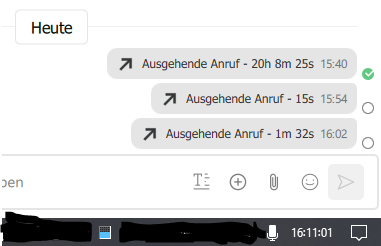
Since then we see on the PC clients in the group session a never ending call invitation. In the contacts overview on the left side a phone symbol on the right side.
And if I click on the chat at the top a green phone with an animated circle.
If I click on this symbol I have for a short moment the possibility to press the red “End call” button.
But the call continues. Then a message pops up: “The owner of this group call seems not reachable. Do you wish to host the call?”
If I press “Host only this call” the phone rings an I have a NEW group call. Ending this call dosn’t change the situation. We have still the animated green phone button. Additional I have the audio enabled Icon in the task bar and Jami consumes 40% CPU power.
This is a UI-related issue. In fact, a permanently displayed call prompt may indeed appear in groups. Currently, this issue has not been fixed, but it is certain that the developer has noticed it. However, we understand that the developer’s workload is very heavy, so this kind of bug that does not affect the main functionality of Jami may take longer to be fixed
There is a way to fix this. The fix involves deleting a file that indicates to Jami that a call is in progress. Unfortunately, I have forgotten where the file is located.
Attempted to find the instruction on GitLab, without success.
Sorry for my late response. All mails from Jami were declared as spam from GMX.
The Status after 2 weeks is:
I’ve kind of arranged with it. I leave it as it is.
At my PC client the CPU load rises from 5% to 40%, when I select the group with the endless group call invitation and drops to the old value, when I select another group. The call invitation survived the Jami update at the PC.
The other group member with a PC client saw the invitation in the beginning but it disappeared after some days.
The group members with Jami on Android phones never noticed a open invitation. Some complain about high accu usage but I can’t say if this is normal. At my Android phone Jami is the biggest consumer. It uses 3% accu for 5 minutes screen time. I measured the battery current with AccuBattery Pro and there is no difference regarding wich conversation I have open.
While I got used with the circling call button came overnight an active video call button. The CPU load of Jami jumps now to 70% when I select this conversation.
As before the users with Android phones do not see this calls. All in the group say, that they didn’t initiate a call.
The exploding phone icon was a joke by someone in the group whom I had annoyed too often with the topic. I’m sorry I didn’t recognize it as a joke.
Currently, I am the only one who can see the audio and video call. The audio call disappeared for him after a few days.
This means that ticket #2167 is correct for the audio call. I don’t know where the additional video call came from.
Update:
The video call disappeared, possibly after the last update.
The initial audio call is still there and continues to use 40% of the CPU power when I select the group chat.