The most recent client version - Build ID: 202603202006
I have my own bootstrap/proxy server set up and running (recent codebase as well)
and two accounts in Jami client (on Debian 12 if it matters)
What’s confusing:
while for one account my proxy persists (and works well), for another one once I turn on proxy with my server in the field, Jumi uses default one instead (as you can see)
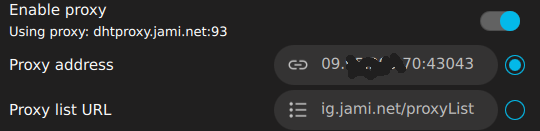
and - moreover - replaces my server string in the field with its default value after re-entering Advanced settings (switching accounts in bottom-left).
bootstrap setting for both accounts is magically “frozen” on my old server and even if new setting persists across re-entering Advanced by switching accounts in th bottom-left, it resets to old one once you close Settings.
Very strange 
What I am doing wrong, guys?
BTW, it’s very confusing that Settings don’t have kinda Save/Apply button which could bring error messages if something goes wrong with settings.
Now Jami UI just silently applies or not applies what you want it to - without any warnings/errors. Not that user-frindly to my point of view 
UPD:
after manual edit
/home/<user>/.local/share/jami/<account_number>/config.yaml
==>
hostname: ip:port ##UDP, bootstrap node
proxyServer:: ip:port ##TCP, DHT proxy node
RingNS.uri: 208.67.222.222
turnServer: ip:port
turnServerUserName: username
turnServerPassword: password_in_plaintext
turnServerRealm: realm
both - bootstrap and proxy - fixed firmly and work as expected.
Obviously there are some issues with config saving in the client.
And Apply/Save button, please!
BTW, probably it’s related to ownership - I just realized that recently I fired
chown -R <myuser>:<myuser> /home/<myuser>
which could break some wrong Jami expectaions in terms it could save in my user profile something owned not by me. Please tell me that it isn’t a case, guys!