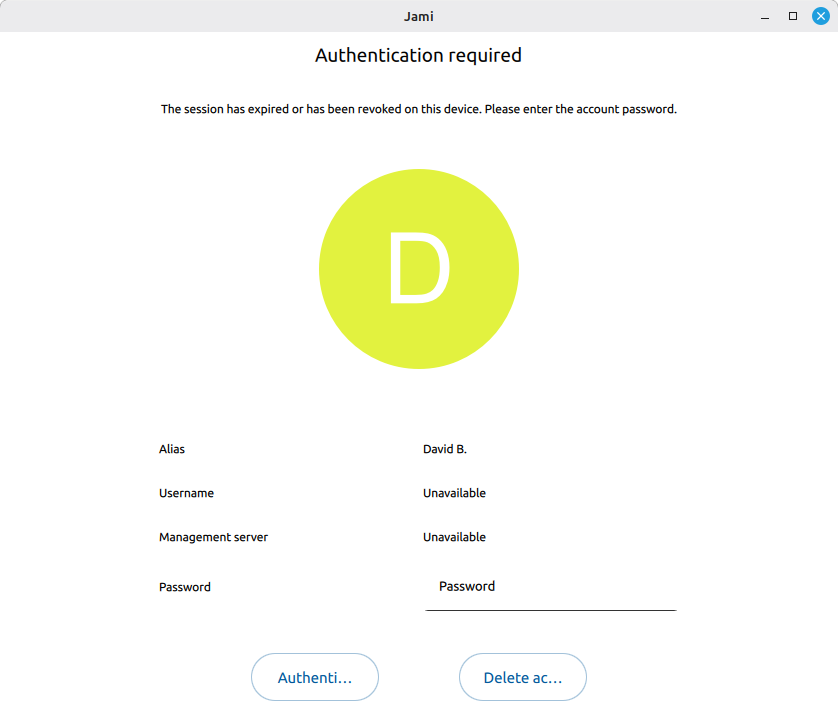
However, it is not clear to me what my next step ought to be. What you see in the screenshot is the only thing that I can access. Thank you for your thoughts.
This seems to mean that your device has been removed from the device list (at this time the corresponding key will be revoked). This does not mean that Jami considers your account to be password-protected. Can you try leaving the password field blank and continue (click that “Authenticate”)?
Thank you for your kind reply.
Unfortunately, with no input entered for a password, the “Authenticate” button is not clickable. When I hover the mouse pointer over the “Delete account” button, it changes colour, indicated that it could be clicked. However, when one hovers over the “Authenticate” button, it does not change colour, warning that even if one does try to click on it, nothing will happen (as is indeed the case).
The ironic thing about all of this, is that I was logged into Jami and using it just fine. I closed it for the update, did the update, and then restarted Jami. Instantly, I can’t even get back in anymore.
Thank you for reporting this issue. If you start Jami from a terminal with the command jami -d, do you see any of the following errors in the logs? Which ones?
Thank you, this is most helpful. When I invoke the program as you suggest, there are many of these issues in the verbose reporting. For example, in the order in which you have shared them:
No public key found: [1780375949.654|57510|account_manager.cpp :167 ] [Auth] No public key found in announce (account: 96d9bda0a7e17d93c3ce87f0fa04cf29e978a92d, device: 616b2ed6998132ea37d2677f1fe41ef633b7ede1)
Unable to load archive: not this exact error. But there is this: [1780375949.654|57506|accountarchive.cpp :43 ] Archive JSON parsing error: * Line 1, Column 1
Syntax error: value, object or array expected.
Line 1, Column 2
Extra non-whitespace after JSON value.
Invalid certificate request: this does not seem to appear.
The content is very long, and I’m not sure which ones are important.
Also: [1780375949.797|57490|account_manager.cpp :578 ] [Account d3605db03a82383c] getContacts(): account not loaded
[1780375949.797|57490|account_manager.cpp :691 ] [Account d3605db03a82383c] getTrustRequests(): account not loaded
[1780375950.911|57522|ice_transport.cpp :991 ] [Device 988eaa450ae8ef7e4f7a09b5cbf73e1a0188f694f040d6f51670f2138432cbab] UPnP mapping failed: JAMI-f43b9f045bf26f02-TCP:13396 (state=FAILED, auto-update=NO)
[1780375950.911|57522|upnp_context.cpp :1436] Unregistered mapping JAMI-f43b9f045bf26f02-TCP:13396
[1780375950.911|57522|ice_transport.cpp :1013] [Device 988eaa450ae8ef7e4f7a09b5cbf73e1a0188f694f040d6f51670f2138432cbab] [ice:0x7fa280036e50] UPnP mapping failed: expected 1 mapping(s), got 0
looks like your file ~/.local/share/jami/d3605db03a82383c/archive.gz may be corrupted…
you can try to copy it (for example in /tmp) and gunzip it. The content is a single huge string with all account details in JSON. It should start with a “{” and content no unquoted space…
However, if the archive is encrypted as I suspect, then the second step with gunzip is going to fail.
I did some tests and looked at the relevant parts of the code today, but I didn’t find any bug that could lead to a no-password account having an encrypted archive. I may very well have missed something though, especially if there was a bug in older versions of Jami that no longer exists today. How long have you had your account? Did you create it on your current Linux Mint machine, or did you import it from another device (and if so, when)?
Thanks, both.
Perhaps neither encrypted nor corrupted. The reason being, there is no such file in that directory.
cp ~/.local/share/jami/d3605db03a82383c/archive.gz /tmp/
cp: cannot stat ‘/home/username/.local/share/jami/d3605db03a82383c/archive.gz’: No such file or directory
Now, I use this Jami account on a few different machines. In the .local/share/jami/ directory on each of these machines, there are multiple directories with these overly long alphanumeric names. On this computer, there are two. On another computer that I have, there are three such subdirectories. All of those seem to contian the archive.gz files that you describe.
I have a second computer located somewhere else, so today I went there and as I had not done the update, that account on that machine is still working fine. So, I backed up the account. Possibly the path of least resistance is to simply wipe Jami from this home computer, reinstall, and then try to import the archived account?
Just to underscore, however, all of these problems emerged when I did the update from the Debian 13 Jami repository. For this reason, I haven’t yet allowed my second computer to do the update. Most importantly, though, this is a really good program. I use it every day.
Sorry, I realize that I did not answer all of your questions. I have only been using Jami for the past year. I found it when Microsoft stopped supporting Skype, so perhaps May 2025. This said, I did an entire OS upgrade in between. I would have moved the Jami account from one OS to another. Thanks again.
For accounts that were imported from another machine, it’s possible for the archive file to have a different name. Do you perhaps have an “export.gz” in ~/.local/share/jami/d3605db03a82383c/?
If you also have this account on another machine, then yes, reimporting it may solve the issue. You don’t need to wipe and reinstall Jami for this. You can just move the d3605db03a82383c/ directory from ~/.local/share/jami/ to somewhere else on your computer; then Jami won’t be able to find it, so it should just start normally and you should be able to attempt the import. (Deleting the d3605db03a82383c/ directory would also prevent Jami from finding it, of course, but it’s probably better to just move it at first to make sure you don’t lose any data.)
I think I understand why the problem emerged when you updated to the latest version of Jami, but I don’t know what the root cause is yet. I’ll post an update if I find out more. In the meantime, I agree it’s probably better not to update Jami on your second computer.
Great suggestion! I looked in the directory, and indeed there was a file called export.gz. So, I renamed it archive.gz and started Jami.
It now seems to work again (though I haven’t yet tried it for a call, or any text messages). The main thing is that it isn’t asking for a password any longer, and I can see my contacts.
There are still some smaller funky behaviours. The tiny Jami icon in my panel has a red dot indicating an unread message (when there aren’t any). And, when I tried to quit the program, to restart it, to see if the dot would go away, the program would not immediately quit. Instead, it took perhaps 30 or 45 seconds to quit, before finally closing. However, these are things with which I can live.
 Most importantly, though, this is a really good program. I use it every day.
 But I’m glad you gained back access to your account.